

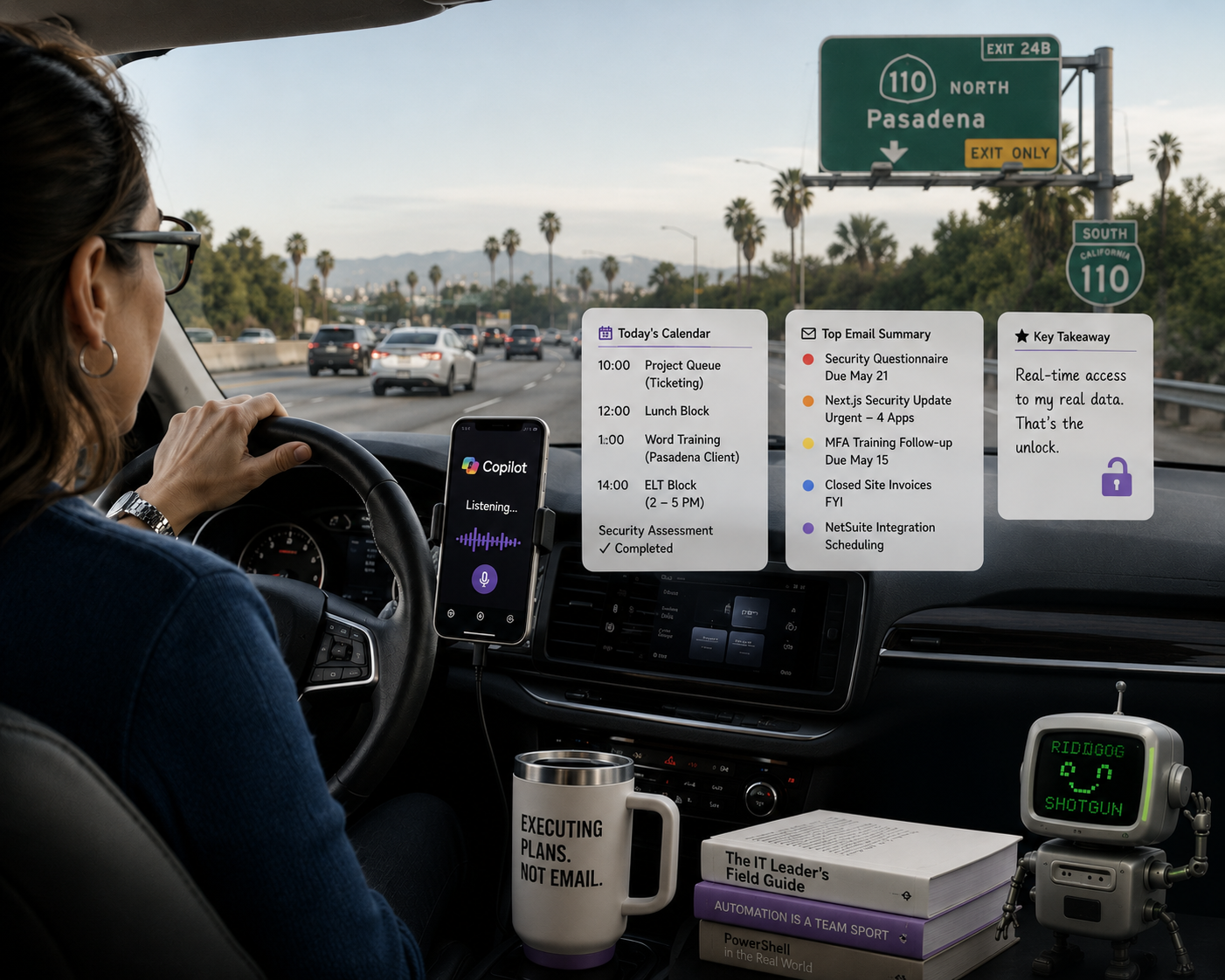
My AI minions just learned how to ride shotgun. One of them, anyway, and it was not the one I expected. One step closer to world domination… but first, somebody still has to actually drive the car.
I have written before about my 49 named Claude Code agents. Each one has a job. Most of them live in my terminal, where I do the bulk of my real work. They write proposals, route my inbox, plan projects, track budgets, and remind me to take breaks (Bernadette is annoyingly good at that one). My morning briefing arrives at 6 AM courtesy of AdaptoBriefing, a Claude Code skill that pulls my calendar, my tickets, my Airtable data, and the things I actually need to care about into a styled HTML email I can read with my coffee.
That system works great. It also requires that I be home, sitting at my desk, in front of a screen.
This morning I was not. This morning I was leaving the South Bay headed for a Pasadena client, which from my place means the 405 to the 105 to the 110, picking up the 110 well before it runs out of freeway. I was paying close attention to my speed, because by the time I crossed into where the 110 goes from freeway to parkway I had already counted three California Highway Patrol cars pulling people over. I was also paying attention to the actual road, which is what you are supposed to do when you are driving. And in between all of that, I talked to Copilot voice chat the way I would talk to someone on the phone.
The Setup Nobody Talks About
Microsoft Copilot voice chat has been around for a while. I have ignored it. I am a Claude person. I have built my entire workflow on Claude Code, and most of the AI tooling I use day to day runs through that ecosystem.
But Claude does not have a real-time voice interface that pulls my live calendar and inbox while I am driving. And I needed exactly that.
So I opened Copilot voice chat, said good morning, and told it to speed up its voice a notch. It did, immediately, and the new pace felt right. Half the reason I had never tried this before was the assumption that I would spend ten minutes fighting menus to get it to stop sounding like a customer service hold message. One sentence. Done. Move on.
What I Actually Asked It To Do
I asked Copilot what was on my calendar today. It read off my five meetings cleanly. An early morning security assessment for two of my clients, already finished. The weekly project queue meeting at 10. Lunch blocked at noon. A staff Microsoft Word training at 1 with my Pasadena client. An ELT block from 2 to 5.
Then I got curious. The project queue meeting is a recurring block that ConnectWise creates and categorizes as a work session against the ticket queue. I asked Copilot if there was a ticket reference attached to that meeting. It told me yes, there was a category labeled “Ticketing” on the event, which confirmed the meeting was a working session against tickets, not a planning meeting.
That is a small thing, but it mattered. I did not have to remember why that block existed. I did not have to pull up Outlook and read the body of the meeting invite. I asked a question in plain English from behind the wheel and got an accurate answer in under five seconds.
Then I asked about email. Copilot read me a prioritized summary of what came in overnight. A security questionnaire from a client engagement with a May 21 deadline. A Next.js security update flagged as urgent for four apps. An MFA training follow-up needed before May 15. A note about closed site invoices. A reply on a NetSuite integration scheduling thread.
It did not read me every email. It read me what mattered. The prioritization was good enough that by the time I hit my exit, I knew which two items needed attention before lunch, and which three could wait until after the staff training.
The Game Changer Is Not The Voice
Voice assistants are not new. Siri has read me my calendar for years. Alexa can tell me about my next meeting. Google Assistant has been doing this kind of thing on Android phones since before I had gray hair.
The difference is not voice. The difference is that Copilot voice chat can actually see my work data, in real time, the way I see it on my laptop.
When I asked about the project queue meeting, Copilot was not pulling from a cached snapshot or a stripped-down phone summary. It was reading the actual calendar event, with its actual categories, in my actual Microsoft 365 tenant. When it read my inbox, it was reading the same Outlook I would have read at my desk. The integration is native. The data is live. The auth is sorted out at the tenant level so I do not have to think about it.
That is the unlock. Voice without real data access is a parlor trick. Data access without voice is a desk-bound workflow. The combination is what makes this feel like a tool I would actually use again tomorrow.
The Claude Gap, And Yes I Said It
I have written about my Claude Code agent army before and I will write about it again. I am still, by any reasonable measure, a Claude power user. The terminal is where I live. Most of my serious work runs through Claude in some form, either claude.ai for thinking and writing or Claude Code for building and automating.
But this morning, Claude could not have done what Copilot did. Not because Claude is less capable in raw intelligence. Claude is, in my opinion, the stronger model for most of the work I do. The gap is in the access pattern.
I cannot open Claude on my phone while driving and ask it to read my Outlook calendar in voice mode. The Claude mobile app does not have a hands-free voice interface that hooks into my work data the way Copilot does. Even with the right MCP configuration on my desktop, I would have to invent a way to get that experience onto a phone running an in-car Bluetooth connection. That was not a workflow I could spin up in the seven minutes before I needed to merge onto the 110.
There is a second gap worth naming, and it is the one that actually stung. When I asked Copilot about the project queue meeting, it did not just read me the title and the time. It read the Ticketing category attached to the event and used that to tell me the block was a work session against the queue, not a planning meeting. My morning briefing agents, including AdaptoBriefing, do not do that yet. They read the calendar payload, list the events, and tell me what time things start. They do not classify the blocks as meetings versus ticket time versus focus blocks versus personal time, and they should. The ConnectWise category data is sitting right there in the event metadata. The briefing just is not using it. Copilot was using it this morning, and the difference showed up the second I asked a follow-up question.
So Copilot won this morning. The honest thing to do is admit that.
What Copilot Voice Chat Is Not Good At
I want to be specific about the limits, because this is not a love letter. Copilot voice chat got my morning briefing right. It would not have gotten my actual work right.
To its credit, Copilot was honest about that during the drive. I asked at one point if it could draft an email response for me, and it told me straight that it could not write emails or anything along those lines through the voice interface. What it could do was respond back conversationally so I could verbalize my to-dos out loud, and then I could pull up the chat transcript later from my desk to find what I had committed to do. That is actually a useful pattern. Talk through the work while driving. Review the transcript at the desk. Execute the work in the tools where the work belongs.
Ask it to draft a careful client email and the prose comes out generic. Ask it to think through a multi-step technical decision and you can feel the model leaning on shallow patterns. Ask it to debug anything in Claude Code or write a real piece of automation and you would be better off pulling over and opening a laptop.
The thing it does well is exactly what it did for me this morning. Read my data back to me. Summarize what came in. Confirm specific facts about specific items in my tenant. That is a narrow capability, but it is a real one, and it is one Claude does not match on my phone today.
What This Tells Me About Where AI Tools Are Going
The competitive ground for AI assistants is not the model anymore. It is the integration surface. The model that wins your morning commute is not the smartest one in the lab. It is the one that already has hooks into your calendar, your email, your tickets, and your tasks, with a voice interface that works on your phone while it is plugged into your car.
Microsoft has a structural advantage here that should worry anyone betting on a pure-model future. They own the productivity stack, the auth, the device experience on most corporate phones, and the calendar and inbox that runs most of my client environments. Copilot does not have to be the smartest model in the world. It has to be smart enough plus everywhere I already am. Claude has the model lead and the MCP ecosystem is real and growing fast, but the question for a lot of users is not which model is better. The question is which AI is available in the moment they need an answer.
What I Actually Want To See
Here is the part where I tell Anthropic what I would pay for, in case anyone is reading.
A voice mode in the Claude mobile app that hooks into my Google Workspace and my Microsoft 365 data through the MCP servers I have already configured. Hands-free. Phone in the cradle, car plugged in, no taps required to start a session. Same model I trust on the desktop, same agent ecosystem I have built, but accessible by voice when I am behind the wheel.
I am not asking for perfection. I am asking for parity on the access pattern.
If Anthropic ships that, I move my commute workflow to Claude immediately. Until then, Copilot voice chat has my drive time.
The Real Lesson For IT Leaders
I am writing this because I think a lot of IT leaders are in a similar spot. We pick a primary AI tool. We invest in it. We build our workflows around it. We become internal advocates for it. We tell our teams which tool to use and why.
Then real life happens. You are driving. You are in line at coffee. You are walking into a meeting and you need a quick fact pulled. The tool you chose is not in the right place for the moment.
The honest move is to pick the right tool for the right moment, even when it is not your favorite tool. I will still write my proposals in Claude. I will still build my agents in Claude Code. I will still run AdaptoBriefing from my desk every morning at 6 AM. But I will also use Copilot voice chat when I am driving, because for now, it is the right tool for that moment.
Both things can be true at the same time. The whole point of an AI strategy is to know which tool wins which moment, not to pretend one tool wins them all. If you are still treating the AI vendor question as a winner-take-all bet, you are setting yourself up for the same trap we fell into with single-vendor everything in the 2010s, and you already know how that played out.
This is also why I pay for multiple AI subscriptions and I am not even a little apologetic about it. I have ChatGPT. I have Claude Max at the 200-hour tier. I have Copilot on my Crimson Microsoft tenant and on my AdaptoIT Microsoft tenant. Each one earns its keep in a different lane. ChatGPT for image generation through the custom GPTs I built to keep my client mascots visually consistent across hundreds of training and awareness emails. Claude for the serious writing, the agent building, and anything that needs to think carefully through a multi-step problem. Copilot for live data inside whichever M365 tenant I am working in at the moment. The best move is not picking one platform and pretending it does everything. The best move is paying for all of them and learning which one wins which avenue.
Closing
If you have not tried Microsoft Copilot voice chat and you have a long commute, give it a shot tomorrow morning. Open the Copilot app on your phone before you start driving. Pair it to your car. Say good morning and ask what is on your calendar today. See how it handles your inbox.
You might come back to your desktop tool of choice when you get to the office. I did. But the seven minutes I spent talking to Copilot this morning told me more about my day than any pre-coffee email scroll has in a long time.
The minions are still mine. They are just learning that some of them work better through a phone than through a terminal.
And somebody still has to drive the car.